Local Tax Tables - Edit
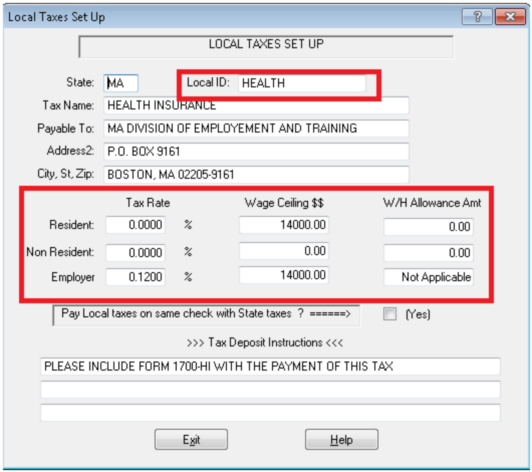
Local ID
Enter a name for the Local ID. Enter this Local ID in the Default Locality 1 or 2 box in System Setup. When this Local ID is entered in System Setup as a default, any new clients are also automatically set up for the tax. All employees are subject to the tax automatically, unless specifically exempt under Employee Add or Change.
Tax Name
Enter the name of the tax for identification purposes.
Payable To
Enter here the name of the Local tax agency, exactly as it appears on the tax checks. ProPay prints tax checks for all local taxes due as frequently as specified under Employer Setup > Screen 1.
Tax Rate
Enter the tax rate(s) for Residents, Non-Residents and Employer, respectively.
Wage Ceiling
Wage ceiling means that when an employee's Year-to-Date earnings reach a certain level (wage ceiling), any additional wages are not subject to taxes for the remainder of the year.
W/H Allowance Amount
Some localities allow for a certain amount per exemption to be non-taxable. If this applies in your locality, enter the annual withholding (W/H) allowance amount here.
Pay Local Taxes on Same Check With State Taxes?
If you check this box, ProPay prints both State and Local taxes on one check. This is usually true where the collector for both state and local taxes is the same agency.
Tax Deposit Instructions
Anything entered here is printed on the "check stub" of the Local Tax Check. Enter instructions on what day of the month these taxes are due, etc.