System Setup for Direct Deposits
> Looking for the complete guide? See Direct Deposit - Complete Guide for end-to-end instructions.
Before processing direct deposits, configure your ACH processor settings and file format preferences. This one-time setup ensures ProPay creates correctly formatted NACHA files for your financial institution.
Access Direct Deposits Setup
- Click Client Functions > Setup > Direct Deposits Setup.
Note: If your ACH processor has specific file layout requirements and you need assistance, email their specifications to Paysoft support for configuration guidance.
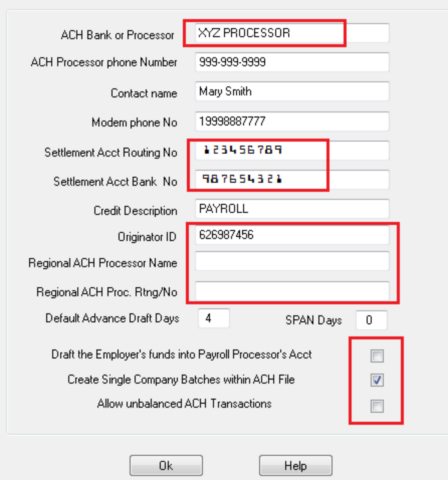
Configure ACH Processor Information
ACH bank or processor
Enter the name of the bank, financial institution, or ACH processor that processes direct deposits for your clients' employee paychecks.
ACH processor phone number and contact
Enter the phone number and contact person name for voice communications with your processor.
Processor modem phone number
Enter the bank's modem phone number (if applicable). This number is automatically called when you submit a direct deposit batch file.
Note: Most modern ACH processors use web-based file uploads rather than modem connections.
Bank routing number
Enter the 9-digit bank routing number. Find this number:
- On the bottom of any check from your bank.
- By asking your bank contact person.
Bank account number
Enter the account number for your clearing account that handles direct deposit debits and credits. Find this number:
- On the bottom of a check from this account.
- By asking your bank contact person.
Credit description
Enter a description (maximum 10 characters) that appears on employees' bank statements explaining the credit entry.
Example: "PAYROLL" or "SALARY"
Configure ACH File Format Settings
Originator ID
Enter the identifier required by your ACH processor for the type "1" record (File Header Record, position 14-23, length 10).
Common requirements:
- Your federal ID number.
- Your financial institution's 9-digit routing number.
If left blank and you draft the employer's account, ProPay uses the payroll processor's federal ID number as the Originator ID.
Regional ACH processor name (optional)
Enter the name of your regional ACH processor if required. This appears in the "1" record of the ACH file. If unsure, leave blank (defaults to the bank's name).
Regional ACH processor routing number (optional)
Enter the routing number for your regional ACH processor if required. This is used in the type "1" record (File Header Record, Immediate Destination, position 4-13, length 10).
If left blank, ProPay uses the Originator ID. If filled in, this replaces the Originator ID in that field.
ACH processor routing number
Enter the routing number used in the "5" record of the ACH file. If left blank, ProPay uses the payroll processor's bank routing number. Otherwise, enter the 9-digit bank routing number or any other number provided by your ACH processor.
If unsure, leave this field blank.
Configure Processing Options
Default advance draft days
Very important: This determines how many days before the pay date you draft your client's bank account.
Standard approach:
- Draft the employer's account 1-2 days before the pay date.
- Funds are available in your account at least one day before pay date.
- Funds reach employees' bank accounts on the pay date.
Alternative approach:
- Draft on the regularly scheduled pay date.
- Employees with paper checks get paid as scheduled.
- Employees with direct deposit access funds 2+ business days later.
SPAN days
Enter the number of days to use as a filter for viewing transactions from today's date.
Example: Enter 7 to filter transactions with settlement dates within the next 7 days.
Warehousing use: If your ACH processor doesn't have warehousing capability, use SPAN Days to warehouse ACH transactions on your computer and release them as many days in advance as needed.
Draft the employer's funds into your account
Check this box if you want funds to flow from the employer's account into your payroll processor account, then to employees' accounts.
Effect on ACH file:
- Checked: ProPay uses the payroll processor's federal ID number in the "5" record.
- Unchecked: ProPay uses the employer's federal ID number in the "5" record. Funds flow directly from employer's account to employees' accounts.
Verify with your ACH processor which method is acceptable before creating and submitting ACH files.
Create single company batches within an ACH file
Check this box to create separate batches for each company within your ACH file.
Benefits:
- Identifies the source of each transaction.
- When you transfer funds from employer accounts to your account, then later to the IRS and employees, the receiver sees the employer's name as the transmitter rather than the payroll processor's name.
Allow unbalanced ACH transactions
Check this box to create unbalanced (single-entry) ACH transactions instead of balanced transactions.
Before enabling: Verify with your bank or third-party ACH processor which format they accept.
For more information, see Unbalanced ACH transactions.
Related Topics
- Direct Deposits Overview
- ACH Processor Setup
- Transmitting Direct Deposits
- Employee Direct Deposit Setup
- ACH File Format